

Go paperless by updating your preferences today!
Get your documents online with the UPMC Health Plan app and the UPMC Health Plan member site
Instead of sending you printed versions of your plan documents, we'll send you a link so you can see your documents online. This includes documents such as your Annual Notice of Changes (ANOC), Summary of Benefits, Evidence of Coverage (EOC), prescription drug formulary, provider directory, and member guide. You can also choose to get other UPMC Health Plan communications online. Changing your preferences will replace getting these documents in the mail.
Update your preferences in the UPMC Health Plan Member Site
Get started by clicking the button below. Choose which materials you want to get electronically and how you want to get the notification when they are ready (by email or by both email and text). Keep the toggle switched to purple to get all the materials online.
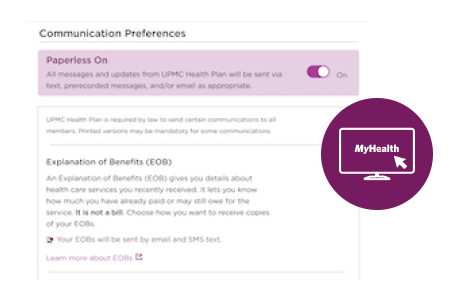
You can find your plan documents in the UPMC Health Plan member site at any time by clicking Coverage Overview under Coverage and Benefits on the homepage.
View my plan documents in the UPMC Health Plan Member Site

Update your preferences in the UPMC Health Plan Member App
You can also update your preferences in the UPMC Health Plan app on your mobile device. To open the preference center in the app, scan the QR code from your mobile device:

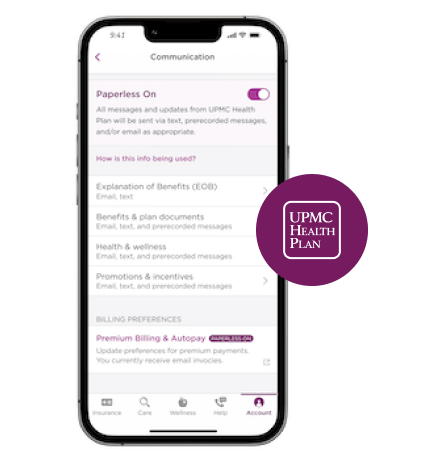
To access the preference center in the app, tap Account, then tap Preferences. Make sure your email and phone number are filled out in the Contact information page.
To choose to get your documents online, go to the Communications page from the Preferences screen. Choose which materials you want to get online and how you want to get the notification when they are ready (by email, or by both email and text). Keep the toggle switched to purple to get all your materials online.
You can find your plan documents in the app at any time by tapping Plan Details on the Insurance screen, then tapping on your medical plan.
If you want to continue getting your printed plan materials in the mail, you don’t need to do anything. We’ll always mail a hard copy to you unless you update your preferences.
If you’re a first-time user, creating a UPMC Health Plan Login is fast, easy, and secure!
- Visit our New User Registration page or download the UPMC Health Plan app to your device.
- Follow the prompts to create your login.
Keep your UPMC Health Plan Login safe and secure! After you create your login, you will use the same username and password to log in to the UPMC Health Plan app and the UPMC Health Plan member site.
Do you need help updating your preferences?
Schedule a personal appointment with a Tech Guide!
Depending on your digital needs, we can quickly answer your questions over the phone or schedule you a personal appointment with one of our UPMC Health Plan Tech Guides. We offer appointments over the phone and in person at our UPMC Health Plan Connect Centers. Just give us a call at 1-833-685-5418 (TTY: 711) Monday through Friday from 8 a.m. to 8 p.m. and Saturday from 8 a.m. to 3 p.m. to talk to us about what option works best for you.
Schedule an in-person appointment with a UPMC Health Plan Tech Guide.
Medicare resources
View MoreThis information is not a complete description of benefits. Call 1-866-400-5077 (TTY: 711) for more information. Out-of-network/Noncontracted providers are under no obligation to treat UPMC for Life members, except in emergency situations. Please call our customer service number or see your Evidence of Coverage for more information, including the cost sharing that applies to out-of-network services. Other physicians/providers are available in the UPMC for Life network.
This information is available for free in other languages. Please call our customer service number at 1-877-539-3080 (TTY: 711).
UPMC for Life has a contract with Medicare to provide HMO, HMO D-SNP, and PPO plans. The HMO D-SNP plans have a contract with the PA State Medical Assistance program. Enrollment in UPMC for Life depends on contract renewal. UPMC for Life is a product of and operated by UPMC Health Plan Inc., UPMC Health Network Inc., UPMC Health Benefits Inc., UPMC for You Inc.
SilverSneakers is a registered trademark of Tivity Health Inc. SilverSneakers GO is a trademark of Tivity Health Inc. © 2026 Tivity Health Inc. All rights reserved.
UPMC for Life Members
Call us: 1-877-539-3080
TTY: 711
Oct. 1 – March 31:
Seven days a week from 8 a.m. to 8 p.m.
April 1 – Sept. 30:
Monday through Friday from 8 a.m. to 8 p.m.
UPMC for Life Prospective Members
Call us: 1-866-400-5077
TTY: 711
Oct. 1 – March 31:
Seven days a week from 8 a.m. to 8 p.m.
April 1 – July 31:
Monday through Friday from 8 a.m. to 8 p.m.
Aug. 1 – Sept. 30:
Monday through Friday from 8 a.m. to 8 p.m. Saturday from 9 a.m. to 3 p.m.
Y0069_260014
Last Updated: 10/1/2025